FEATHERS LOGOUT:
(async () => { try { let result = await feathersApp.logout(); console.log(‘the result is: ‘ + result) } catch (e) { console.log(e); } } ) () ;
PROXY SOLUTION: — 2020-04-02
https://stackoverflow.com/questions/60498087/issues-running-socket-io-over-an-apache-proxy
feathers-facebook using localhost works fine when running locally, but when running through a proxy, problems arise.
to get it working:
in ./config/default.json:
1) change “host” to the actual domain name. example:
“host” : “featherstest.website”,
2) add the “defaults” tag and include “protocol” and “host” under the “oauth” section:
    "oauth": {
         "defaults" : {
                "protocol" : "https",
                "host" : "featherstest.website"
        },
      "facebook": {
        "key": "2XXXXXXXXXXXXX1",
        "secret": "0XXXXXXXXXXXXXXXXXXXXXXXX4"
      }
    }
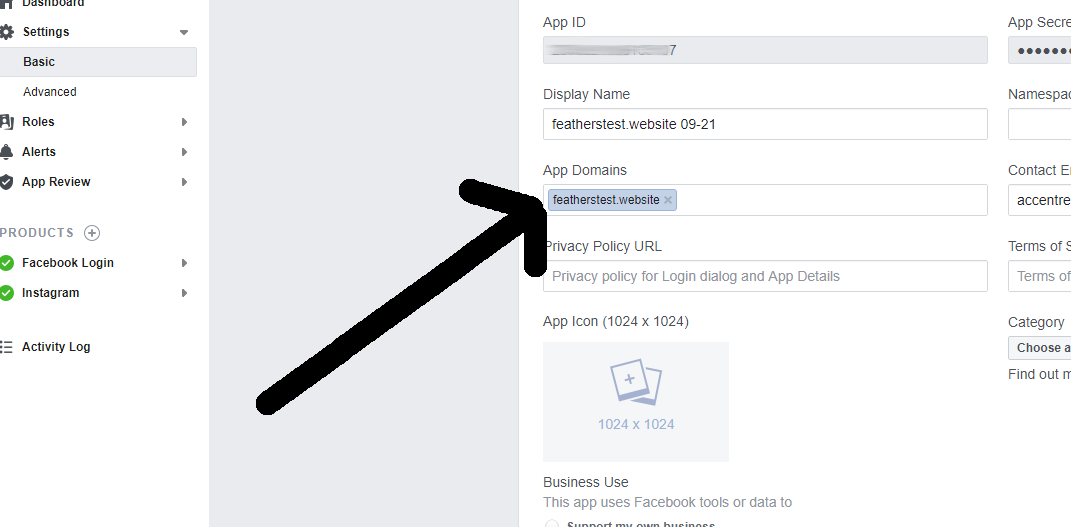
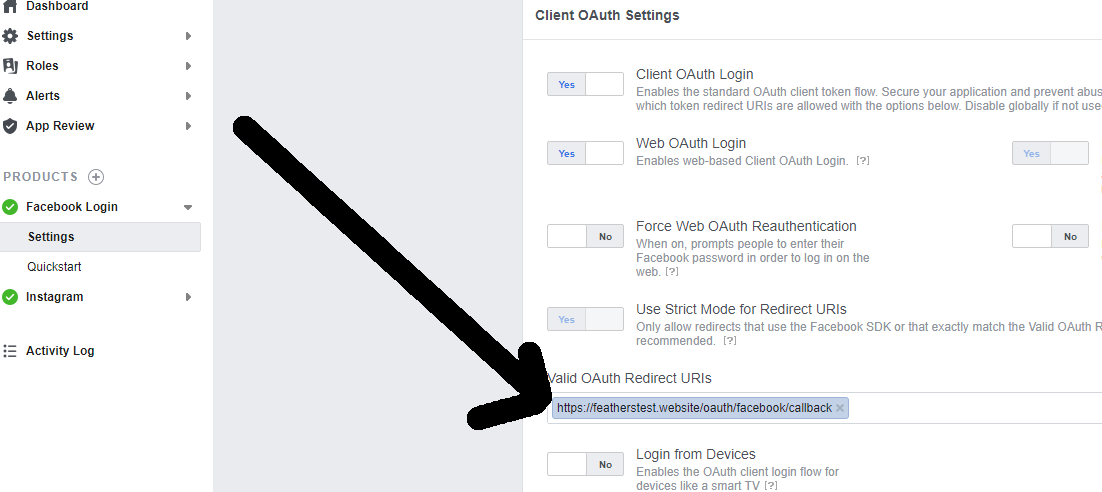
3) make sure facebook has the correct domain name and callback for facebook:
4) to get extra fields such as “email”:
https://docs.feathersjs.com/cookbook/authentication/facebook.html#getting-profile-data
in ./src/authentication.js:
const { AuthenticationService, JWTStrategy } = require(‘@feathersjs/authentication’);
const { LocalStrategy } = require(‘@feathersjs/authentication-local’);
const { expressOauth, OAuthStrategy } = require(‘@feathersjs/authentication-oauth’);

//      added all below:

const axios = require(‘axios’);

class FacebookStrategy extends OAuthStrategy {
  async getProfile (authResult) {
    // This is the oAuth access token that can be used
    // for Facebook API requests as the Bearer token
    const accessToken = authResult.access_token;

    const { data } = await axios.get(‘https://graph.facebook.com/me’, {
      headers: {
        authorization: `Bearer ${accessToken}`
      },
      params: {
        // There are
        fields: ‘id,name,email’
      }
    });

    return data;
  }

  async getEntityData(profile) {
    // `profile` is the data returned by getProfile
    const baseData = await super.getEntityData(profile);

    return {
      …baseData,
      email: profile.email
    };
  }
}
// end of added


module.exports = app => {
  const authentication = new AuthenticationService(app);

  authentication.register(‘jwt’, new JWTStrategy());
  authentication.register(‘facebook’, new FacebookStrategy());  // added!

  app.use(‘/authentication’, authentication);
  app.configure(expressOauth());
};
COMPLETE EXAMPLE FOR FACEBOOK AND GOOGLE:
./config/default.json:

{
  “host”: “featherstest.website”,
  “port”: 3030,
  “public”: “../public/”,
  “paginate”: {
    “default”: 10,
    “max”: 50
  },
  “authentication”: {
    “entity”: “user”,
    “service”: “users”,
    “secret”: “i/E4LXXXXXXXFxffc=”,
    “authStrategies”: [
      “jwt”,
      “local”
    ],
    “jwtOptions”: {
      “header”: {
        “typ”: “access”
      },
      “audience”: “https://yourdomain.com”,
      “issuer”: “feathers”,
      “algorithm”: “HS256”,
      “expiresIn”: “1d”
    },
    “local”: {
      “usernameField”: “email”,
      “passwordField”: “password”
    },
    “oauth”: {
        “redirect” : “/”,
         “defaults” : {
                “protocol” : “https”,
                “host” : “featherstest.website”
        },
      “facebook”: {
        “key”: “2XXXXXXXXXXXXXXXXXXXX107”,
        “secret”: “dfXXXXXXXXXXXXXXcebdbd”,
        “scope”: [“public_profile, email”]
      },
      “google”: {
        “key”: “813XXXXXXXXXXXXXXXXXX4di.apps.googleusercontent.com”,
        “secret”: “XXXXXXXXXXXXXXXXXXXXXMi”,
        “scope”: [
          “email”,
          “profile”,
          “openid”
        ]
      }
    }
  },
  “nedb”: “../data”
}
./src/authentication.js
const { AuthenticationService, JWTStrategy } = require(‘@feathersjs/authentication’);
const { LocalStrategy } = require(‘@feathersjs/authentication-local’);
const { expressOauth, OAuthStrategy } = require(‘@feathersjs/authentication-oauth’);
const axios = require(‘axios’);
class FacebookStrategy extends OAuthStrategy { async getProfile (authResult) {
const accessToken = authResult.access_token; const { data } = await axios.get(‘https://graph.facebook.com/me’, { headers: { authorization: `Bearer ${accessToken}` }, params: { fields: ‘id,name,email,picture’ } }); return data; } async getEntityData(profile) { const baseData = await super.getEntityData(profile); return { …baseData, name: profile.name, email: profile.email }; } }class GoogleStrategy extends OAuthStrategy { async getEntityData(profile) {
const baseData = await super.getEntityData(profile); return { …baseData, profilePicture: profile.picture, email: profile.email }; } }module.exports = app => { const authentication = new AuthenticationService(app);
authentication.register(‘jwt’, new JWTStrategy()); authentication.register(‘local’, new LocalStrategy()); authentication.register(‘facebook’, new FacebookStrategy()); authentication.register(‘google’, new GoogleStrategy()); app.use(‘/authentication’, authentication); app.configure(expressOauth()); };./public/index.html (partial)
…………..
============================================
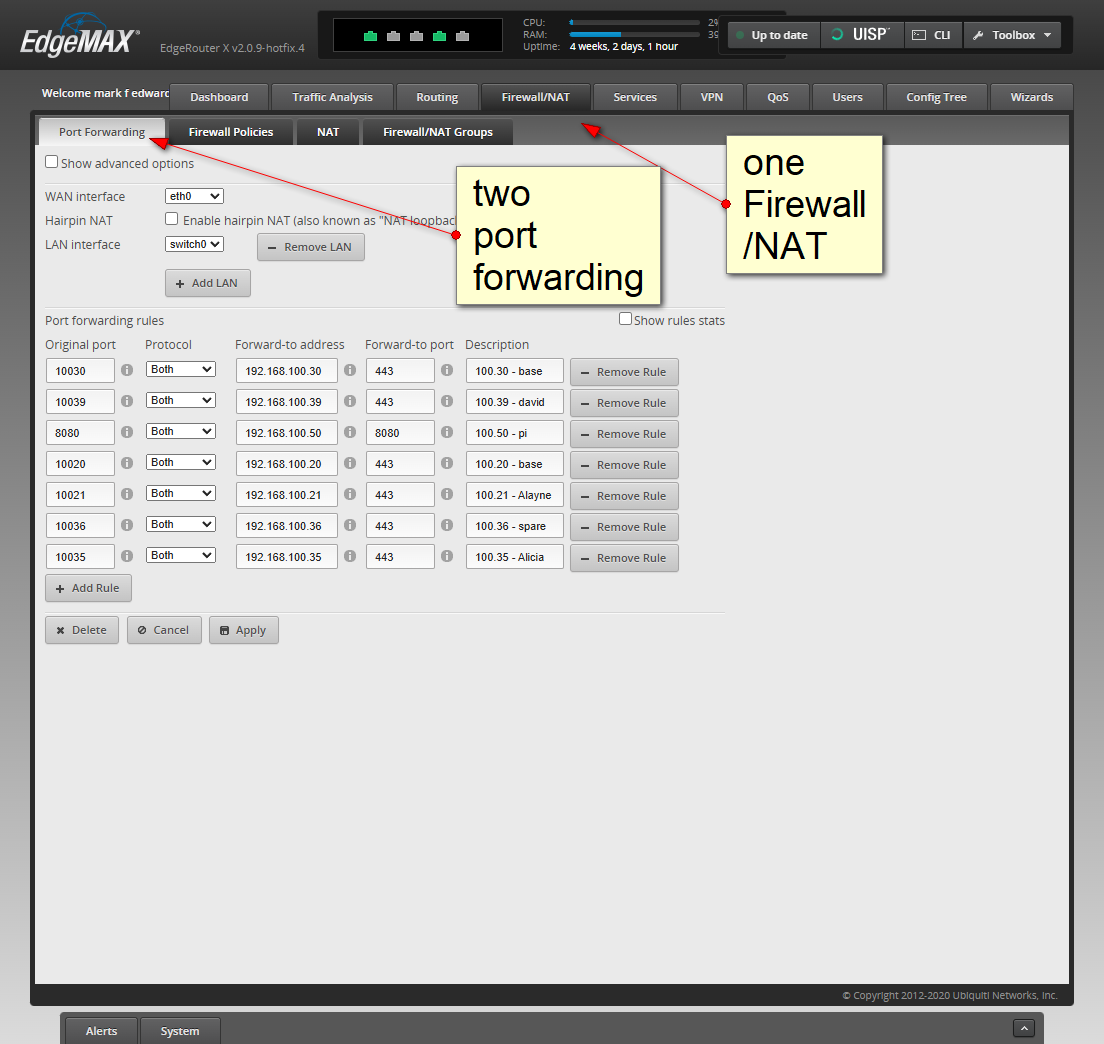
port forwarding: (2025-05-22)